#15: Git for Open Source Development
Introduction
So what is Open Source all about? Is it significant? Why would you want to contribute? And if so, how can you contribute?
Before getting into the details of all of this, it’s worth pointing out that you’ll want to have gone over the Git Basics covered in Jacob’s talk this year. Otherwise, it might be tricky to understand what we’re trying to achieve here.
Open source software (OSS) is software where users have the right to change and distribute the software and its source code to anyone for any purpose. Usually, this means that development is done in public, versus proprietary software where the code is developed by a company or individual and kept private. A large proportion of the most used software in the world is either open source or built on an open source base. Perhaps the most obvious success in OSS is Linux, which powers everything from the world’s biggest websites to smart fridges. Try going to the “3rd Party Licenses” or “Legal Notices” section in your phone settings and see how long the page is.
When people talk about contributing to open source, what exactly do they mean? Generally, they’re talking about any work on or around open source software. This doesn’t just mean code, it could be documentation, managing issues and bugs, planning the futures of projects and more.
So there are many reasons you might want to contribute. Maybe there’s a piece of software written that you’d like to share so others can download, use and extend it. Maybe there’s a really annoying bug in some software you use that you’d like to help report, diagnose, or fix. Maybe there’s a project you find really cool and you want to help it succeed in its vision.
Most open source projects are very welcoming to new contributors. Often, everyone already working on the project is also a volunteer and so they’re happy to see new people interested in the project. Be careful about starting by trying to contribute to the biggest projects. They usually have a well defined (and often non-obvious) process for most things due to their size, and it can be very difficult to get it right. However this is not the case the vast majority of the time, I only mention this as trying to get started with open source by contributing to the Linux kernel would be a real trial by fire.
Also, occasionally you will come across projects where the source code is open, but it is developed mostly by a corporate entity or similar where external contributors are less welcome. For example, some parts of android are very hard to contribute to if you don’t work at Google, even though they’re open source, as the development happens behind closed doors and then gets released quarterly.
You’ll also run into software which is source available but not open source - that is, the source code is available for download but comes with restrictions such as no right to distribute compiled executables. Aseprite is a good example of this. Sometimes these projects accept contributions, but if they do the contributor almost always must release all rights over their contribution to the project owner. If you come across a project with a Contributor License Agreement (CLA), this is almost certainly what’s happening.
Git forges
When you have a project that multiple people are working on, it’s useful to have a collaborative version control system that stores code and (usually) documentation. For this most projects use Git, which you hopefully are vaguely familiar with from previous sessions. Having a bare Git repository that you only interact with on the command line is not the best user experience however. Most projects will want a website which provides an interface to view the code repository, which often also serves as a landing page for the project that others can view in their web browser to learn a bit about what the project is.
When you combine a Git repository web interface with features designed around collaboration, you have what’s called a Git forge. Key features include the ability to track issues on the project, track proposed code changes from other developer’s branches (often called pull requests or merge requests), create releases with additional notes around what’s changed, CI/CD pipeline support and management of what users have write access to the repository.
By far, the most popular Git forge in use today is GitHub, which provides a featureful and easy to use interface. You may have also heard of other forges such as GitLab or Codeberg. If you like self hosting, there are many options for running your own Git forge (cgit, Forgejo, Gitea).
Mirrors
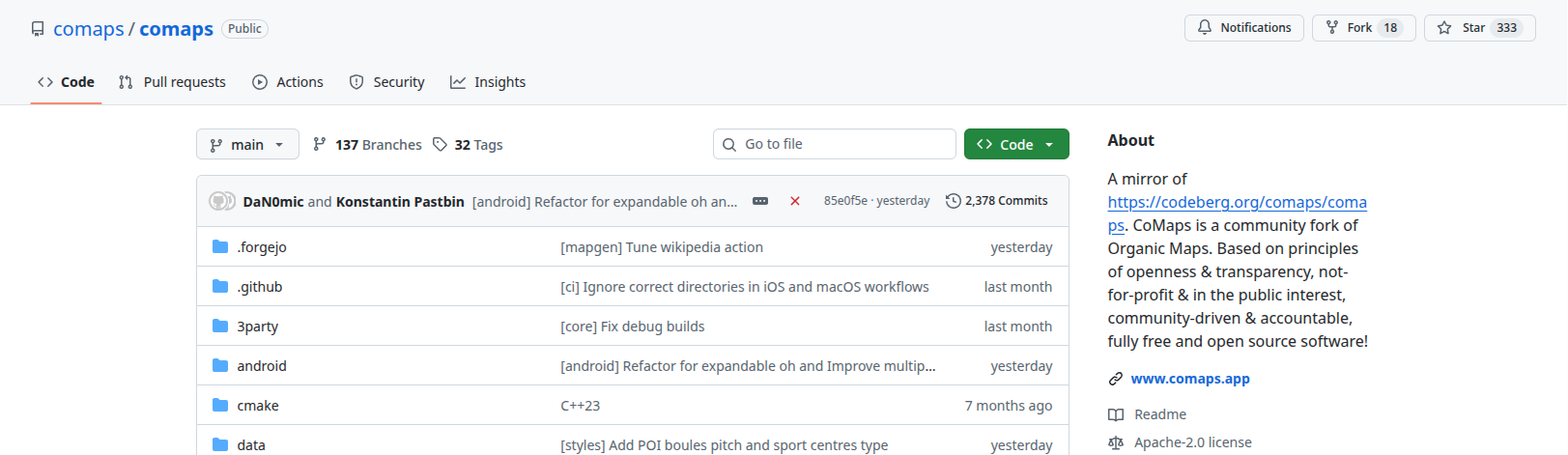
Git forges are a single point of failure, but Git repositories are just a collection of files. Therefore quite often you will find software mirrored to other forges. Mirroring is where an up to date copy of the repository is maintained at another location (usually another forge). The important thing to know about mirrors is that if you want to contribute, you need to locate the original source. Pull requests or issues submitted against a mirror repository will usually be ignored, or if you’re lucky, closed with a message telling you where to go. Mirrors almost always have a note in the description letting you know where the original source is.
Operating in open source projects
Open source projects all have their own community feel and conventions, but there are a few common bits of etiquette which are important to appreciate.
The most important point is that everyone is a volunteer. You didn’t pay anything for this software, or for support on it, and everyone working on it is doing so purely as a volunteer. Maybe the project author receives a few £s a month of donations, but it’s almost never a significant amount that allows them to take away time from working a normal job. Since nobody owes you anything, it’s incredibly important to be polite and respectful of everyone’s time. For example, if you’re asked to go and debug an issue yourself, it’s not because the project maintainer doesn’t want to help you. They could look into it themselves, but they won’t have the time to do that for every issue reported. So give it your best honest attempt and report back with exactly how it went. Always feel free to ask questions, but don’t expect to sit back and have someone else do all the work for you.
Likewise, when you report an issue or send off some code for review, remain patient. It’s likely that it will be a while before someone has the free time to look at it, especially if there are higher priority issues with the project that need to be resolved first. If the project has a sole author, it might be as simple as them being on holiday for a few weeks.
As part of taking care when contributing, it’s also important to take some time to understand how the project maintainers want people to contribute. Most projects with more than a few contributors will have a contributors guide or wiki which will guide you on the process to follow as well as smaller things such as coding conventions. It’s also worth taking a look around existing issues and pull requests that are open or recently closed. This will give you an idea of how other people are contributing; you probably want to do something similar.
A.I…
Unfortunately at this point I am forced to mention generative AI. I strongly suggest against using “Agents” to find or solve issues and then sending their changes as a pull request. If they succeed at solving the problem, they usually do so in a way that’s incompatible with the rest of the project in terms of style and/or structure. AI generated issue reports and pull requests waste a lot of maintainer time. The rule of thumb: if you can’t be bothered to write it, why should a maintainer bother to read it?
If you do solve a problem using a model and you’ve manually reviewed it yourself to be sure of quality, I would still recommend disclosing the source of change in the description of your pull request. This is important context for maintainers, as the kind of mistakes models make are often not things you’d usually need to look out for when reviewing. If attributing code to the model which wrote it personally bothers you, you should consider why you feel uncomfortable about it. Your personal moral framework is in need of review.
Contributing to open source projects
Issues
Issues are where problems are tracked in open source projects. This most often takes the form of specific bugs in the software. However, issues are also often used for support tickets (Help, I don’t know how to use/do this) and feature requests (Can you add this please?). If you’re in either of those categories, have a look around the project on the forge to see where the right place to report them are. Some projects use the “Discussions” feature for this, and some prefer you to bring them up externally e.g. in a chat channel or on a separate forum. You may also see issues being used to track longer term goals within a project.
A good issue report makes all the difference. As mentioned, most maintainers are busy and short on time. So if you take the time to write a good report and make it easy for the maintainer to respond, the chance you get a response is much better.
Anatomy of a good issue
If the project provides an issue reporting template, make sure to read this first and stick to it. It will include all the important fields that the maintainers want to see.
- State exactly what the problem is
- State exactly what you’re observing
- State exactly what you need to do to make the problem happen
- If you don’t know, try to see if you can make it happen again yourself and figure out what it is
- If you can’t figure out a specific cause but the issue still continues to occur, it’s still worth reporting the issue but note that you don’t have a clear way to reproduce it
- If the problem only started happening recently, determine exactly what version of the software the problem started happening in
- To do this try older versions until the problem resolves
- This is annoying and time consuming, but it saves the maintainer that same time
- Include all relevant factual information you can think of
- Anything that seemed strange or unusual behaviourally is worth mentioning
- If the software crashes and generates crash dumps or logs, make sure to attach these to the report
- Include screenshots or video recordings of the issue if possible
- The cause of the issue might be something you don’t realise is significant and don’t note down, but is clear to a project maintainer watching a recording
- Try to avoid speculating on possible causes unless you’re sure that it’s relevant
- Unless you know the project well, it’s likely there’s context you’re missing
Pull requests
Pull (or merge) requests are for when you have a change you want to “pull” or “merge” into the repository. If this was a project you were working on by yourself, you’d probably choose to push it straight to the main branch. There’s two reasons why you can’t do this in collaborative projects. The first being that unless you’re a project maintainer, you won’t have the permission to. The second is that you’ll want to give other people working on the project (and automated checks) a chance to review your changes so you can discuss and improve them.
To submit a PR, you first need to have your own copy of the repository on the Git forge you’re using. This is usually referred to as “forking” the repository, and your own copy is called the “fork”. The reason behind is that when you make your own copy, this copy is a static snapshot of the repository. Any changes you make afterward form an alternative history to the future commits in the original repository. So in that sense, the timeline of Git commits has forked into two, one in the original repository and one in yours. Another consequence is that any changes made in the future in the original repository won’t appear in yours, unless you specifically pull them in.
Once you’ve got a fork, you can push your changes to it (since the fork is yours, you have full access to it). Then, you can use the Git forge web interface to create a pull request. Here you choose the branch you want to merge in (the one you just pushed to), and the branch you want to merge it into (probably the main branch). The name of your branch doesn’t matter and can be anything. I’d recommend creating a new branch on your fork for every change you want to make. It will be much easier to manage things.
At this point, you’ve got to write the PR description. Here you want to lay out what your changes achieve. The maintainers will read the code, so you don’t have to describe it, though if the change is large, an overview of the architecture might be useful. The most important part to include is what decisions you made and why you made them; it’s very useful to see what other options someone considered when implementing a new feature or fixing a bug.
Review
The next part of making a change to a project is review. If there are automated tests, you’ll be able to see what’s passing and failing. You’ll want to resolve all the failing tests, and usually if you’ve tested your solution locally it will be easy things to fix e.g. the automatic code formatter needs to be run.
Generally you’ll receive two kinds of feedback. First, an overall response to what you’ve proposed. If the reviewer isn’t happy with the overall approach to solving the problem they’ll note it here, and you can use their feedback to further revise your solution. Secondly, you’ll receive comments on specific lines of the code with questions or suggestions. You’ll want to consider each suggestion and integrate it if you think it’s a good idea. Review is a two way street and all maintainers know this too, so if you disagree with a suggestion, push back and explain why (politely of course). Once you’ve made changes you think are needed, you can make another commit and push it to your branch. The pull request will automatically update with the changes you’ve made.
Once a reviewer is happy with your PR, generally they’ll approve it. This is a signal that your PR is good to go. Every project has a different standard for review, some require just one approval before they’ll merge changes, and others will require multiple reviewers. The larger the maintainer team, and the larger the change you’re making, the more review you should expect. The maintainers will merge the pull request once it’s met their review standard. If your PR has been waiting for a while on a reviewer or has approvals but hasn’t been merged, consider posting a message in the pull request discussion thread asking what the status is and whether there is anything you can do to help.
Conflict resolution and merge/rebase flow
If you’ve been working on a change for a while, or if you haven’t pulled the upstream repository into your fork before making your changes, there’s a chance that the sections of code that you’ve changed have also been changed in the upstream repository. If you think of where your fork sits in the history, this means that the file has changed in both arms of the fork. In this situation we now have a conflict: how do we resolve the fact that the file has changed in both histories. What should the output of merging the histories be?
The Git forge will let you know if there’s a conflict. In this scenario you have two distinct options: you can merge the new upstream into your branch, or you can rebase your branch onto the upstream.
Most of the time, merging is the easier option. In this case, you resolve all of the conflicts at once inside the merge commit. So the end result is that you get one extra commit on the end of your branch that brings your branch up to date with the upstream. If conflicts happen again (for example if a new one appears while you’re waiting for review), you can repeat the process of merging the upstream branch into your branch.
The alternative is rebasing.
A rebase works by
- Finding a shared ancestor between the two branches (probably your fork point)
- Hard resetting your branch to the branch you’re rebasing onto (probably the upstream)
- Replaying all of the commits between the shared ancestor and the previous tip of your branch on your new branch
As the commits are replayed, some of them won’t be able to be applied cleanly, as the commit changed code which has already been changed on this new branch. For each commit that has conflicts, the rebase will stop, and you will need to resolve all the conflicts. This may mean that when rebasing you need to resolve conflicts many times, as opposed to just once when merging.
However, there are a few advantages to rebasing. Being able to handle the conflicts commit-by-commit often makes it easier to see the correct way to resolve them. Additionally, after the rebase, there are no additional commits in the history so it can be easier to follow.
Generally I recommend merging if you’re new to Git. If it goes wrong it’s much easier to try again, whereas with rebasing you permanently rewrite history and have to work quite hard to get it back (see git reflog). Consider rebasing if you have a well managed commit history and you want to avoid having merge commits.
Keeping your branch in shape
Another thing rebasing is useful for is cleaning up your local commit history (before you open your PR). With an interactive rebase (git rebase -i), you can change the commit messages, re-order, combine and split out commits. So if you made many quick commits when developing or you neglected to write good commit messages, you can rebase to clean things up. I recommend making a copy of the branch you’re working on before rebasing. Then if something goes wrong, you can hard reset your current branch to the copy and try again. Any in-progress rebase can also be aborted (git rebase --abort) if you get the feeling that it’s not going the way you wanted it to.
Setting up a new project and accepting contributions
Let’s suppose you have a new project and you want to set it up so that other people can contribute. What things do you need to get started?
The most important thing is the README.md, which is what every Git forge shows on the landing page of the repository. Describe what the project is, what it does, some cool features and provide usage examples or instructions on how to run/use it. Remember that this is the first impression your project will make, so if you want to attract users it’s worth making it look nice.
You may want to add an issue template and a contribution guide to help people who are new.
You also need to choose a license for your code, which controls what freedoms you grant users. Much ink has been spilled on what licenses are best, but Choose a license is a good summary. Or a bit more humorously, take a look at Misha’s license tier list.
After that, if people are interested they will open issues and pull requests. This time it’s your job to be the reviewer :)
Continuous integration and delivery (make the boring stuff automatic!)
Once you’ve got a project going, you’ll find you spend a non-trivial amount of time testing code works before you merge it into your main branch. CI/CD allows you to automatically test and build ready-to-go artefacts automatically on each commit, release or pull request (as appropriate). It’s absolutely worth having on your own projects and will save a lot of time in the long run preventing bad code from making its way into the repository. You’ll also find most other serious projects using it, so it’s worth knowing how it works and how to operate it. However, I won’t dwell on this further here since Richard already did an excellent job covering CI/CD in his talk.
Git gotchas in open source
There’s a few gotchas which you should be aware of that apply whenever Git commits leave your device. Firstly, every commit must have a name and email on it. If you don’t want to tie your full name to your commits, you might want to choose an alias. Also, you may not want to publish your personal email address to everyone. Most Git forges include an option to hide your email address, and provide you with a noreply address that you can copy to your git config e.g. 57713959+freddie-a@users.noreply.github.com. You can have a look at what your current username and email are with git config user.name and git config user.email.
Another thing to be careful of is secrets. Sometimes you will want to use tokens or passwords in your repository, particularly for CI. An example might be a token that allows deploying a Python package to the Python Packaging Index as your user, so that your CI can deploy new versions to the packaging index automatically. Never put these secrets into the repository, as they will be public to everyone and will be exploited for evil. Also remember that the Git history will show any tokens that existed at any point, so if a token is accidentally pushed you need to revoke it immediately.
The correct way to secure secrets like this is in the Git forge, which will provide a place to store secrets so that that are only accessible to CI through environment variables. Securing secrets in this way is tricky and is a source of constant exploits, sometimes taking over major repositories. Be careful!
Do not store API tokens for 3rd party services in your repository. For example, suppose you are writing a weather app, and to get the weather data you are using an API which requires a token. You do not want to be responsible for the usage cost of all of your users, and also people will be able to extract the token and use it for other things. Although it makes setting up the software more painful, the only sensible way to solve this is to require each user to get their own API token.
The last important thing to remember is the immutability of Git. I already mentioned a bit earlier how the history can be looked through by anyone, and so everything that has ever been in the repository since it’s creation is retrievable. Building on this, it’s also important to remember that once something is in the main branch of a project, you can’t take it out. There’s no editing previous commits, instead you’ll have to do another commit to fix it. So it’s worth double checking all commits before you push them, as it can be a little embarrassing if a new user has a look at your commit history and sees it filled of fixes for silly mistakes that should have never been pushed in the first place.
Conclusion
Though I’ve written far too many words on this topic (sorry!), getting started with open source is really not too hard. You will find that people are very welcoming and look forward to seeing new contributions. And you might even end up meeting some of your fellow contributors at places like FOSDEM and make some new friends :)
Licensed under CC BY-NC-SA.